Rob and I have been toying around with an idea on and off for the past year (read: we’ve written a few emails). The idea, which would be called the Open Music Project, if the name wasn’t already taken, is basically open source music.
The raw, isolated tracks of a recording can be compared to the un-compiled source code of software. The mixed-down and mastered final track that you’d actually get on a CD is analogous to the complied binary code you run on your computer.
In the same way that compiled code can’t really be edited or modified, it is difficult to work with mixed down finished music. It is difficult/impossible to isolate the individual tracks and do anything useful with them (not really an issue, since most music is copyrighted anyway).
Our idea is to have willing musicians and engineers producing music that is open and available for others to use, modify, and redistribute. The music would available in its raw individual tracks, so any or all of it could be used by other.
I’ve been amazed at how the open source software initiative has mammoth corporations, independent developers, non-profit organizations, and small businesses all working to their mutual advantage. It’s not a perfect system. Open source software, since it is developed by developers, usually for their own benefit, is often weaker in the consumer application area and stronger in development software. I’m not sure how these tendencies would manifest themselves in terms of music and musicians (what do you get when you have a bunch of musicians producing music for themselves rather than for an audience – good music, perhaps?).
This idea hasn’t been in the over for very long. One of the big issues would be file formats. There are good and widely supported formats for straight stereo audio (MP3, Ogg Vorbis, Windows Media, etc.). However, it would be idea to have some good standard multi-track formats that were widely supported (perhaps there are? ProTools, Cakewalk, Cool Edit Pro, etc.). Worse case scenario, individual tracks could be distributed in isolated files (MP3, for example) and be re-assembled in a particular musician’s multi-track software of choice.
Is this a good idea? Is it a stupid idea? Would it work? Why? Why not? Has it already been done? Let us know what you think.
I’m really hoping we can call it the Muzilla project. Maybe someone else should name it.
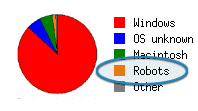 The end is neigh. I can’t say much more, because robots are already browsing this very website and others like it (see the shot of my web stats to the right). In the meantime, let us at least enjoy some amusing

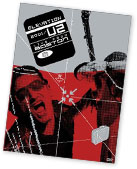
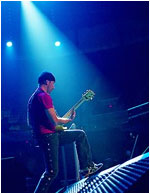 What I found most striking about the DVD was how great U2 is at putting on a rock concert. You can really see the experience of 20 years of touring. Bono plays the 20,000 strong audience like it was a percussive instrument. The Edge’s guitar and Bono’s voice alone can fill a stadium design for NHL hockey.