Great Tweets

As part of their story about the downfall of Twitter, The Verge has compiled an archive of Great Tweets. I might just be tired, but I’ve been laughing for 15 minutes at these.

Not on the list, but a couple of favourites of mine:

“There’s still so much we don’t know about HTML. Even now, scientists are discovering new tags almost every day”

@Orteil42

“Stepping down from my job to devote myself full time to reading the emails from my kids schools”

Joseph Birbiglia @joebirbigs (deleted)

 

Uncovering differences in images with the Web

This video (that I found via Waxy, who found it via the Tom Scott newsletter) does a great job of illustrating how you can visualize subtle or hidden change over time in video:

Thumbnail image from video showing clouds of mixes of bright colors and a YouTube style play button in the middle

In a much less sophisticated example of a similar principle, I sometimes use the ‘Difference’ filter mode in Photoshop (or other image tools) to catch small changes between two images.

As a simple example, these first two images (screenshots of the WordPress settings screen) are almost identical. The third image uses a ‘difference’ blend mode to make this small change obvious.

The differences between the first two images are: a checkbox was moved down a few pixels, and the word “register” was replaced with “join”. If you open the first two images (A & B) in two browser tabs, you can also switch quickly between them and your brain will do the work to highlight the change (just like the T-Rex did in Jurassic Park before it ate that lawyer off the toilet).

As a bonus, the Web has native support for this ‘difference’ blend mode via the CSS mix-blend-mode property. I was able to put together a quick example with some simple HTML/CSS that shows the difference mode without a tool like Photoshop.

See the Pen Blend Mode by Steven Garrity (@sgarrity) on CodePen.


Photography pro tip

If you’re taking a photo and for some reason there’s a door open into a bathroom in the background (which you can probably avoid), follow my photography pro tip:

Close the toilet seat.


What do you call the children of your work -friends?

I asked my coworkers today: We have terms for the children of your siblings, or the children of your children. What do you call the children of your work -friends?

I was satisfied with one colleague’s suggestion of “Coworker once removed.”

Then, many hours later, it dawned on me: Businiece (or the slightly less perfect, Businephew).

All in a day’s work.


6825 hours 39 minutes and 2.45 seconds

If you start a timer on the macOS Clock application and close it, it keeps counting. Like, forever.

I’m up to 284 days. Apparently I started a new “lap” after a few months. Onward.


Trivial Tragedy #8: The coconut

This post is one of a series called Trivial Tragedies. Each installment is a small story of minor heartbreak that has stuck with me from my childhood.

When I was a child, our family bought a coconut from the grocery store. It was a rare and exotic novelty.

We all gathered to try and access the strange and nourishing coconut milk trapped inside the huge hairy stone.

In a time before YouTube, we had to resort to our own ingenuity to open the coconut. We moved the operation out into our garage where we tried a hammer and nails. We tried a drill and screwdriver.

Eventually, we smashed the coconut open and watched as a tiny splash of coconut milk trickled out onto the dirty garage floor.


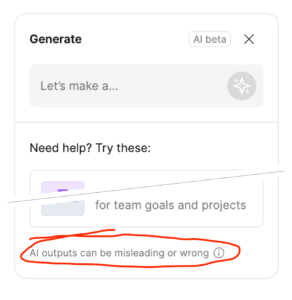
“AI outputs can be misleading or wrong”

AI features keep popping up in all of the digital products I use. Figma, Photoshop, Notion, Zoom. These products tend to prompt acceptance of vague privacy terms that may or may not feed your private/company data into the AI slurry.

Figma added some AI generation tools into their FigJam product under a “Beta” caveat. I’m both impressed at how candid they are and troubled at how they are comfortable shipping a feature that requires such a warning:

“AI outputs can be misleading or wrong”

— FigJam product, which uses AI…

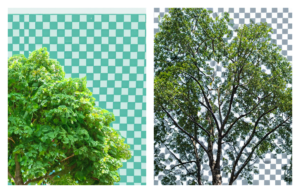
Also, if you ask the Photoshop’s AI-powered “Generative Fill” feature to draw something “with a transparent background”, it renders a messy checker-board background that is sometimes used to illustrate transparency.

Lots of power, lots of potential, lots of problems.


Fiest and friends

Nice cover of Nothing Compares 2 U by Choir! Choir! Choir! with Feist. Found via Kottke.

My distaste for band names with punctuation notwithstanding.


Canadian rockers of a certain age

If you enjoy Canadian rock music from the past three decades, you may enjoy the Trans-Canada Highwaymen.


Jack & Meg White or Ant-Man & The Wasp

If you saw me laughing while walking home from one of my kids’ schools this week, it was because a podcast host said that the two subjects of his story:

“They go together like Jack & Meg White, or Ant-Man & The Wasp”.

Jonathan Goldstein in episode #54 of Heavyweight