Windows Vista: Right on the Button(s)

After experimenting briefly with a beta version, I have determined the best new feature of Windows Vista.

I complained back in 2001 about the rough edges on large form buttons in Internet Explorer. After installing Internet Explorer 7 on Windows XP, this was one of the first things I tested. I was dismayed to discover that the problem still persists.

However, on Windows Vista using IE 7, the corners of wide form buttons are not broken. That alone is worth years and millions of dollars worth of development.
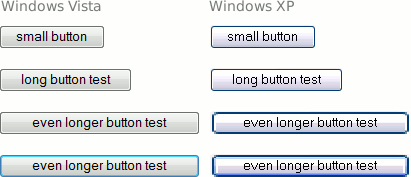
Windows XP vs. Vista form buttons screenshot

That said, I still don’t understand what determines how wide the form buttons actually become (seems to be some kind of length_of_button_text × 1.N formula).

 

Tango Theme for Firefox

Garrett LeSage and a group of other good people have completed a nice upgrade of the Tango theme for Firefox 2. The theme brings the icons from the Tango Desktop Project to Firefox along with many improvements in making Firefox look and feel more like a native application on Linux.

Tango theme for Firefox 2 preview

There are also a series of “sub-themes” as well. The Gnome sub-theme matches with the default Gnome icon theme, Tangerine matches with the Ubuntu theme, and Industrial for the old Industrial Gnome theme.

Highly recommended for those using Firefox on Linux. There are rumblings of an update for the Tango theme for Thunderbird 2 as well.


Firefox 2

Since you are on the internet right now (admit it, you are), you are probably aware that Firefox 2 has been released. My congratulations to all involved. While I was much less involved in the visual design this time around, it was still a pleasure to have been involved at all.

The Mozilla.com website has been updated as well. This website update was something that I was much more involved with than the actual browser update. The design itself was done by the Nobox Marketing Group (get it?) with the implementation handled by our team at silverorange and the good people at Mozilla.

My favourite new feature in Firefox 2 (after the spell checking and recently-closed tabs, that is): Try entering a math formula into the Google search box (I’d recommend 57 * 4 / pi). Notice that the solution to your formula is instantly displayed in the suggested results. Thanks to Paul Kim for pointing out this gem.


Signs of the Times

From my neighbours’ truck:

America has tested 1054 atomic bombs

Other signs of the times:

More photos of signs of the times.