Objects That Come From Nowhere

I’ve noticed that there are certain types of items that I never seem to have to purchase. They just appear. No matter how many of these objects I lose, discard, or give away, there will always be more lying around somewhere.

  • Pens
  • Mugs
  • T-Shirts
  • Mouse Pads

This has to do, I think, with the way in which organizations have a tendency to produce cheap paraphernalia in a vain attempt to render into things tangible, their intangible existence.


Acts of Volition Radio: Session 18

Acts of Volition Radio: Session Eighteen The eighteenth session of Acts of Volition Radio is a collection of some old songs, some new songs, and an appeal to help me track down the composer of one of the songs.

Acts of Volition Radio: Session Eighteen (42MB MP3)
A collection of songs old and new. Recorded Thursday, January 13, 2005 by Steven Garrity. Run time: 47 min.

Session Eighteen Playlist:

  1. My Morning Jacket – One Big Holiday
  2. Pure – The Hammock
  3. The Innocence Mission – Lakes of Canada
  4. The Dell Griffiths – Annakin
  5. Joy Electric and Starflyer 59 – Blue Collar Love
  6. Joe Christmas – Scrabble Girl

For more, see the previous Acts of Volition Radio sessions.

Acts of Volition Radio
Acts of Volition Radio: Session 18
Loading
/
 

The Sound of Data

Spurred on by a recent weekend full of hot-tub induced dehydration, beer, and lack of sleep, some friends of mine discovered an interesting (I think, I at least) capability of the command line computer interface. Prepare to be really geeked-out.

As I wrote briefly about last year, on the Linux command line, you can pass the output of one program into another by joining them together with | (the “pipe” character). For example, if you entered whois actsofvolition.com | gedit, it would take the output of the whois lookup for that domain name and open it in gedit, a text editor.

White Noise

It occurred to one of us, in our sleep-deprived state, that you might be able to pipe the output of the random number generator into an audio player, and hear random noise. So, we tried this:

cat /dev/urandom | aplay

Let me explain: cat is a program to output the contents of a file. The /dev/urandom is a random number generator for linux. aplay is a simple sound player. So here, we are taking random data and asking an audio player to play it. It worked! It sounds like white noise. Here’s a short MP3 sample: random.mp3 (run out my headphone jack and and back into my line-in, since I could figure out how to record the audio directly to disk.

Hearing Your Hard-Drive

So, the next logical step (again, very little sleep) was to try sending in some non-random data. So we tried:

ls -R / | aplay

The ls command displays the contents of the current director. The extra options tell it to start at the root of your hard-drive (/) and go recursively into all sub-folders (-R). It basically lists out the file and folder names on your entire hard drive.

This sounded more like the bleeps and squawks of a modem making a dial-up connection (remember picking up another phone when someone was dialed-up to the internet?). Here’s an MP3 sample: filesanddirs.mp3.

The Digital Anthem

American Flag

Finally, we wanted to hear what some more structured data sounded like. Images and photos in compressed file formats like PNG and JPEG sound pretty much like random noise, due to the compression. However, un-compressed image files, like BMP (bitmap) files are very simple and structured.

So, I grabbed simple bitmap image of the American flag (usa.bmp) and the results are pretty cool. It sounds like digital hardcore.

cat usa.bmp | aplay

Here’s the MP3 of the American flag bitmap file: usa.mp3.


Ben Goodger to Bill Gates: Bring it on


Bill Gates on Starting a Weblog

In an interview with News.com, Bill Gates explains why he hasn’t started a weblog (yet):

“I’ve toyed with doing one myself, but I don’t want to be one of those people who start and then don’t finish it, and again I’m thinking maybe I could do one a month or one every six weeks—something like that. I’d kind of like to, but I’ve got to be sure I can keep going for at least a year to make it worth doing.”

He’s right – he’s better of not starting at all than starting a weblog that never gets updated. If he does start one, though, I’ll read it.


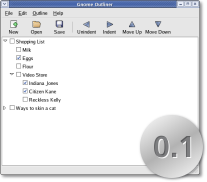
Gnome Outliner v0.1 Released

Gnome Outliner v0.1

The Gnome Outliner project was dreamed up and got started here on this weblog last May. Gnome Outliner is a simple application to write and edit outlines for the Gnome desktop environment for Linux.

There was some nice buzz when the project got started – lots of people were proposing ideas and started writing code in several different languages. After the buzz died down, things slowed on the project for a few months. In the past week, though, we’ve gotten a series of patches and things are starting to get rolling again.

Following the great open-source motto to “release early and release often”, we’ve done our first release: Gnome Outliner version 0.1. It’s not quite ready for every day use, but there is a good base there and I’m anticipating some nice progress in the coming months. Thanks to all who have contributed so far.


How I Became a Free Software Zealot

It started innocently. I started using a free/open-source web browser, then called Phoenix (now Firefox). It seemed to me to be faster, easier, and generally better than Internet Explorer on my Windows XP powered laptop. Soon after, having been unhappy with the performance of Microsoft Outlook with my large volume of archived mail and unwilling to pay for or pirate the promising new (2003) version, I switched from Microsoft’s Outlook to the Mozilla Thunderbird mail application.

Soon after, I made the switch from Trillian to the free/open-source instant messaging client, Gaim. It then dawned on me that the three applications I use most, my web browser, email client, and instant messaging client, were all free/open-source software. Not only were these applications free software, they are also available across multiple platforms (Windows, Linux, and some for Mac OS X).

Armed with the realization that I was close to platform independence, I intentionally sought to weed out the few remaining Windows-only applications in my arsenal. I made the switch from Microsoft Office to OpenOffice.org. This left some games, and Photoshop/Illustrator as the last key proprietary/closed-souce applications in my regular use.

Driven primarily by curiosity and technical/professional interest (particularly in alternative user-interface design), I decided to exercise my newfound platform/operating-system independence and switch my primary laptop to Linux. This was over a year ago and I’ve been relatively happy, given some challenges, since.

All along, these decisions and similar decisions at the company-level where I work were pragmatic. Open-source software is good, but it’s really about using the best tool for the job, be it free/open or proprietary. While the free/open systems were generally beating out the proprietary systems, the decisions were still driven primarily by a (relatively) qualitative comparison of features/quality, rather than any philosophical best about licensing.

I had always been turned off by Microsoft-hating Linux-zealots that play into my stereotype like a bad gay sitcom character. Microsoft has many problems, but they also develop some remarkably good software (I’m a fan of the Office suite and love Microsoft Streets and Trips). What bothered me more than the last-computer-conference-I-was-at-Tshirt attire was the fundamental belief that free/open-source software was better than proprietary alternatives.

However, having lived in a mostly free/open-source software environment for over a year now, I am starting to drink the kool-aid.

I had been running Mac OS X on a old iMac for browser testing purposes and following the development of OS X for a while too. It dawned on me that one of the primary reasons keeping from using OS X as my primary operating system (in addition to not wanting to replace my working hardware), was due the licensing, control, and ownership of the software and platform.

Mac OS X, since it is built largely upon open-source components and protocols, carries with it many of the pragmatic benefits of open-source software. However, since a significant amount of the Mac OS X system is not free/open-source, you do not have all of the freedom you would have on a completely free/open-source system. You are, in the long term, still at the whim of a private corporation (Apple Computer).

To many people, quite understandably, this will not matter – especially since Apple is producing some great software lately. That’s fine with me. I’m not at a point where where I want to force everyone to use free/open-source software. The idea of forcing something in the name of “freedom” just doesn’t sit well with me.

That said, I am starting to think that governments and other public institutions might have some kind of moral and ethical (though not, at this point, legal) obligation to share software it develops or has developed on its behalf.

While I’m not about to start burning the Windows XP license that came with my laptop in the street, I’m starting to take into account licensing and freedom to use and control software in the decisions and recommendations I make for myself and those around me.

 

Charlottetown Municipal Politics Report

Bruce Garrity - he's my dad!
Bruce Garrity, Charlottetown city councillor, and my dad!

I don’t often write about local affairs, since many who read this weblog do so from a distance. However, I have a bit of local news I thought worth discussing. My father, Bruce Garrity is in his second term on the Charlottetown City Council. In his role as chair of the police committee, he helped lead a successful move to close down bootlegging operations in the city.

The bootlegging establishments, though clearly illegal, have long been a very public tradition in the city. Their closing prompted national press coverage and even inspired an artistic campaign of support by some.

Now, just weeks after the closing of the bootleggers, he has been shuffled out of his significant positions on the police committee, bylaw enforcement committee, and fire and emergency services committed. He is now responsible for intergovernmental affairs.

The CBC Prince Edward Island coverage of the shuffle is quite good.


Cleaning Your Bedroom and Improving the World

When I was growing up, my bedroom was always a mess. Every week or two, my parents would get me to clean my room. I wasn’t interested in cleaning my room, but I had to get it to at least pass a quick visual inspection my mom or dad.

To make sure I passed the informal inspection with minimal amount of work necessary, I would stand at the door of my room, where my parents would stand, and look in. I would scan the room and make note of the first thing I noticed that was out of place – pants on the floor, the unmade bed, or whatever was the most visually obviously out of place. Once this was taken care of, I would go back to the door, have another look, and pick the next thing I noticed. I would repeat this simple process until things were looking good enough.

This process has stayed with me ever since and often proves to be useful way to decide what to work on first. Over the past year, I’ve tried to apply this bedroom cleaning prioritization technique to help improve, in a small way, the open source desktop computing experience.

Last fall, I looked at my desktop computing environment and took note of the first thing that didn’t feel right. At the time, it was the ugly old Firefox icon (then called Phoenix). That helped, in small part, get the process started that culminated in the redesign of the visual redesign of all things Firefox and Thunderbird.

More recently, now having a beautiful web browser, I returned to my bedroom cleaning technique and took another look at the desktop and see what bothered me next. This time, it wasn’t visual. Rather, it was the sounds used in the Gaim instant messager application that were the most prominent rough edge.

I set out a few months ago to improve these sounds. Like with the Firefox visual work, I didn’t have all of the skill needed to do the work myself, so I looked to others for help. This time it was Brad Turcotte, a musician (aka Brad Sucks), that came to my aid. He and I bounced sounds that he created back and forth for a while until we had something that sounded right.

These new sounds have now been accepted by the Gaim developers and will be included in a future release.

Now, I’ll have to head back to my bedroom door and take a look around to see what rough edge I notice next.


I walked into work today during a bit of a storm (also see the live Charlottetown webcam for the full wind effect)