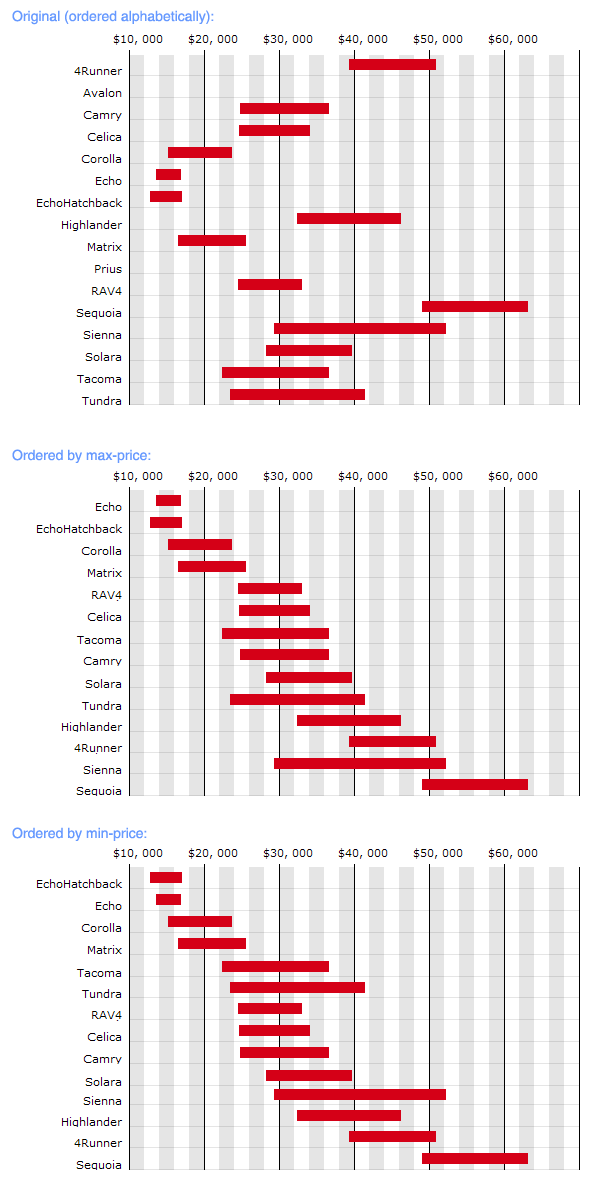
Smart Chart from Toyota Canada

Toyota Pricing Chart PreviewThe Toyota Canada site pleasantly surprised me with this useful pricing chart showing the relative price range of most of their models. It might be even more useful if it were ordered by price rather than alphabetically, so I tried it out.


The silverorange Labs weblog

silverorange labs dudeRegular readers will know that I work at the web development firm, silverorange. Several of us have weblogs of our own (Acts of Volition, CEOBlues.com, and newrecruit.org). We’ve now setup a weblog and site for our side-projects called silverorange labs.

As the introductory post explains, the silverorange team will be posting info on our weblog platform (used to publish Acts of Volition and discussed here previously), our photo gallery system, and other tools and toys.


Hello from UPEI

Hello Dita. See a photo.


Reminder: Weblog Night in Charlottetown

Tonight at 7:00PM at UPEI, Weblog Night in Charlottetown: a seminar introducing weblogs and personal web publishing. All welcome. Tune into CBC Radio PEI this afternoon to hear Peter Rukavina and Catherine Hennessey disussing their weblogs and the seminar.

Update: A good time was had by all. Peter has a good summary of the evening. We’ve also got a gallery of photos from the evening (thanks to all of the camera people).


The view from a Delta II Rocket

Regardless of your views on space exploration, the fact that we can send a rocket to Mars is amazing to the point of being difficult to fathom. This makes the video of Nasa’s recent launch of a Delta II rocket en route to Mars all the more striking. They streamed live video from a camera mounted to the rocket, pointing down towards earth. The video shows the entire launch, uninterrupted, including the jettison of the solid rocket boosters.

Watch the video in RealVideo format. MSNBC has a slightly lower-quality and abbreviated version in Windows Media format if you don’t want to install RealPlayer.


Weblog Night in Charlottetown

Weblog Night poster thumbnailPeter Rukavina of Reinvented.net is organizing a Weblog Night in Charlottetown on Monday, June 16. The aim of the evening is to introduce people to the world of weblogging. I’ll be speaking about how and why I publish Acts of Volition.

Reinvented.net has all of the details:

On Monday, June 16 at 7:00 p.m. a group of weblog publishers will be presenting an “introduction to the world of weblogs” in Charlottetown. The general public is invited to attend — everyone, young or old, Internet literate or not. The seminar will be held in Lecture Theatre A, Atlantic Veterinary College on the campus of the University of PEI.

Presenting will be Steven Garrity, Catherine Hennessey, Rob Paterson and me [Peter Rukavia].

We’ll each talk about our own weblogs (how they came to be, why we publish them, how we publish them, and so on), and we’ll demonstrate the tools we use to publish. They’ll be a healthy time for questions.

We’ve prepared a poster for the evening [30KB PDF file] that you can print off and post if you like (we appreciate help spreading the word).

The evening is sponsored by the University of PEI, Reinvented Inc., silverorange, The Renewal Consulting Group and Island Identity.

Come one, come all!


“Making Pants” – a definition

making pants – (mäk’ing pants) verb.

  1. When a computer hard drive grinds away for no apparent reason, often in the middle of the night, when no humans are around. Usage: What’s your computer doing? I don’t know, it must be making pants or something.
 

Juggling Hamburgers

Another instalment in my “once in your life” series: Mad Cow Disease be damned, at least once in your life, you should juggle hamburgers (1.2MB AVI video).


My First Computer

Adam Kalsey kindly invited me to participate in a distributed writing project called Newly Digital: A distributed anthology of early computing experience. Adam has coordinated a group of writers who are posting about an early computing experience.

Christmas morning, 1993 – the Garrity family tears through a pile of gifts and revels in a sea of wrapping paper (I have a large family). After we were through exchanging our gifts, my parents lead us into the dining room. Right there on the dining room table, all setup, sat a fantastic new Packard Bell 20Mhz 486sx, with 2MB of RAM and a 100MB hard drive. It had a 3.5” disk drive and a 5-1/4” floppy (actually floppy) drive. It was pre-CD-ROM.

Windows 3.1 logoThe bright colors of Windows 3.1 amazed us. We played solitaire all morning. The animation that played when you won Solitaire delighted us. My father still gauges the power of a new computer by how fast it renders the solitaire victory animation.

It had a Turbo button (after a few months, I figured out that green meant slow and yellow meant fast).

A couple of years later, we upgraded from 2MB to 6MB of RAM. Four megabytes of RAM cost $400. $100 per megabyte. It now costs about $0.20/megabyte. The PS/2 keyboard from that old Packard Bell was still used every day at my parents’ house until I bought them a new keyboard this past Christmas. That keyboard lived through 9 years, three computers, and three operating systems.

On that old 486 I discovered the web and designed my first website for-pay.

I paid $45.95 US for an early beta version of Windows 95 (then codenamed “Chicago” or “Windows 4.0”). It came on 37 floppy disks (honestly).

When did you get your first computer? I’m not looking to see who had the oldest computer – I’m more interested in what made your first computer memorable.

Other participants in the Newly Digital project:


XUL: How I learned to love non-native GUIs

I hate skins and I love native GUI widgets. Microsoft and Apple had a relatively strong set of user interface controls that people are familiar with. Yet loads of developers seem keen on reinventing these devices from scatch. Media players seem to be particularly bad at this. Microsoft’s own Windows Media Player and Apple’s own QuickTime Player both seem to throw out the entire GUI toolkit and start from scratch, building totally confusing (and totally x-Treme) interfaces.

A good user interface should get out of the way. Particularly an interface for an application that delivers content (show us the content, and get out of the way). If you want totally x-treme, you don’t upgrade your media player skin – you download Limp Biskit videos.

When the Mozilla project moved to create their own cross-platform GUI toolkit, many people who were concerned with the user experience cried foul (including myself in this January 2001 rant about skins, and this August 2002 update). The idea struck me as the result of developer-centric thinking and complete disregard to the end-user. A cross-platform GUI would make things much easier for the developers, and a bit easier for the minority of users who work on multiple operating systems, but it isn’t much good for Joe-Windows-User.

Here we are, three years later, and I think they may have been onto something. First, let me be clear that you should always use the available operating system native GUI widgets when you can. Chances are the alternatives you will develop will suck.

Mitch Kapor’s Open Source Application Foundation has chose to stick with native GUIs on their Chandler application. This is a smart decision. Most skinned application suck. Trillian would be a great instant messaging program if it weren’t for the over-skinning (that said, I do use Trillian as I find it to be the best of the worst).

Put the UI in my hands

Enter XUL (pronounced “zool”). XUL is the XML User-interface Language developed by the Mozilla project. It allows developers to define the user-interface of their application using a combination of “off-the-shelf” standards (primarily CSS and JavaScript). The end result is a relatively accessible architecture for interface design.

XUL does to the user-interface what View Source did to web development. Though I have the advantage of a web-development background (familiarity with the key technologies, like CSS), I can do things to a XUL-based app that I could not do on other applications. For example, I found some of the icons on the toolbar of the Mozilla Firebird browser to be poorly designed – so I replaced them (this was as easy as saving new PNG files and dropping them into a .JAR file). The search box was too narrow – so I made it wider (this was absurdly easy).

These may seem like insignificant examples, but it opens up a level of control over the application that is not possible with other design methods.

It’s about quality and consistency

Another key development that has softened my stance of Mozilla’s break from the OS native interface is quality and consistency. Microsoft has been squandering their lead. The quality and consistency of the Windows GUI has been deteriorating rather than improving. Microsoft has also devalued their native Windows interface by allowing it’s own applications, including their media player and the massively important Office suite, to shirk the standards.

XUL, meanwhile, has gotten much better. The software is constantly improving (and incorporating native OS widgets where appropriate – which is a nice touch). Performance is no longer an issue on newer hardware. Where XUL-based apps might have taken a performance hit compared to native Windows apps, the difference is insignificant on recent hardware.

The Mozilla Firebird browser project shows that XUL can be used to develop a quality interface.

Will the operating systems rise again?

I should note that Apple’s OS X may be an anomaly in that the quality has actually been improved over previous versions of the OS. Regardless of your opinion on the style of the OS, it is clearly well rendered. Microsoft is planning on following in Apple’s footsteps by having DirectX handle the desktop GUI in the same way Apple is using OpenGL. There is a chance here that Apple and Microsoft may leap ahead of other interface systems. However, I think it’s more likely that developers of XUL will tap into these improvements than be left behind.

Platform Freedom and Platform Friction

In 1997, Netscape’s Marc Andresen claimed that:

“[b]rowsers will reduce Windows to an unimportant collection of slightly buggy device drivers”

If anything, it is XUL that has the power to do this. I originally thought that the ability to develop applications that run on multiple operating systems with relative ease wasn’t much good, since the overwhelming majority of computer users are running only Microsoft Windows. However, after my recent stint on a Mac for a week and having switched from IE to Mozilla Firebird as my primary web browser, I’m starting to see something more significant going on.

A friend of mine pointed out that for the average novice Windows user to switch to an alternative operating system, they would also be forced to deal with an entire new set of applications. However, if Mozilla Firebird becomes your primary web browser and OpenOffice.org becomes your primary office suite, the platform friction is greatly reduced, as these applications are available on other operating systems. Web-based services and applications are another layer that can work well on any OS. Once you’ve got Johnny windows user into his Hotmail account, he doesn’t care if he’s running Windows 98, OS X, KDE, or Gnome.

But I still hate skins

I do still hate skins. I dream of a simple media player that uses native GUI controls. I hate that every new version of Microsoft Office includes redesigned menus and toolbars. However, in the accessibility of XUL, I see a small example of how the wall between developers and users can be torn down.

More info on XUL: