Tim O’Reilly’s wishlist for 2004
The Mozilla Foundation is looking for a web developer to help with a few projects
The latest update to open-source instant messaging client, Gaim 0.75 is released – it’s the first time I’ve had my name in a ChangeLog – cool!
Alan McLeod totally captured that horrible freezing crunchy snow sound on video (shudder)
Audio interview with Tim Berners-Lee (8.2MB MP3)
Linky: A great extension for Mozilla Firebird
One of the many great things about the Mozilla Firebird web browser (go get it now if you aren’t using it), is a decision the developers made early in the project. In order to keep the application simple, fast, and elegant — any features that aren’t essential or may be limited in appeal to a fringe group of users are not included in the browser. Rather, they have made it easy to build (and easy to install) add-ons to the program, called Extensions.
 With this simple decision, the Mozilla Firebird team has managed to avoid one of the great pitfalls of open source development — creaping featuritis. Whenever someone asks for a new feature, the answer is almost always: that should be an extension (and it usually already is an extension). Extensions can also serve as a test bed for features that may eventually be rolled into the core (under the watchful and discerning collective eye of the core development team).
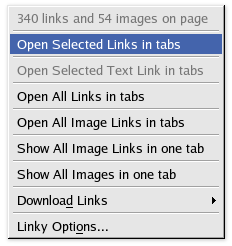
What prompted this ode-to-extensions was an extension that I find particularly useful. Called Linky, this simple extension adds an extra menu item to the context menu when you right-click on a selected portion of a web page. You can select a portion of a page (a paragraph with a few links, a group of linked thumbnail images, or a list of links), right-click, and choose Open Selected Links in Tabs.
This simple feature is a great time-saver (what I’m saving my time up for, I’m not sure).
There over 100 other extensions available as well.
One of the funniest Strongbad Emails in a while (flash)
Why we need the web
The web browser and the technologies that live inside it (primarily HTML/CSS but also JavaScript and the server side scripts that power web applications) have many limitations when compared to “real” applications. When I say “real applications”, I mean an application that runs outside of a web browser on your own computer (a Win32 app, OS X app, Java app, etc.).
These “real” applications can take advantage of the power of your local computer to provide better user interface toolkits and interactivity. They can also store data locally. This makes great sense for applications like email, newsgroups, mailing lists, RSS reading, or media distribution, like Apple’s iTunes Store (which is more like a hybrid web/real app, to be fair). These applications don’t have to have clunky user interfaces built in the limited world of HTML.
Why, then, do we use the web for so many of these activities rather than these custom applications. Web-based email is becoming as popular as traditional email clients. Many people still browse web news and weblogs rather than use RSS readers, Google Groups has taken newsgroups onto the web, and most mailing lists now have web-based archives.
Why? The simple power of the hyperlink. You can’t link to a newsgroup posting in a newsgroup application. You can’t link to an item in an RSS feed. You can’t link to an email on a mailing list.
This key feature is so important that it is often worth living in the limited world of the web-based interface just to keep the ability to link to the things we create.
You can, though, have the best of both worlds. RSS is the prime example of this. RSS readers give you all the benefits of being real native/local application, but the content they serve is all available through a normal web-browser — where it can be linked to. This is why, even if everyone one eventually reads our weblogs via RSS, we still need the HTML-based version.
Most mailing lists also do this well. Most interaction (reading and posting) is done through a traditional email client). However, a web archive gives you a place to link to when discussion older posts.
We need the web. Other applications are complimentary — not replacements.