Panoramas from the Left Coast

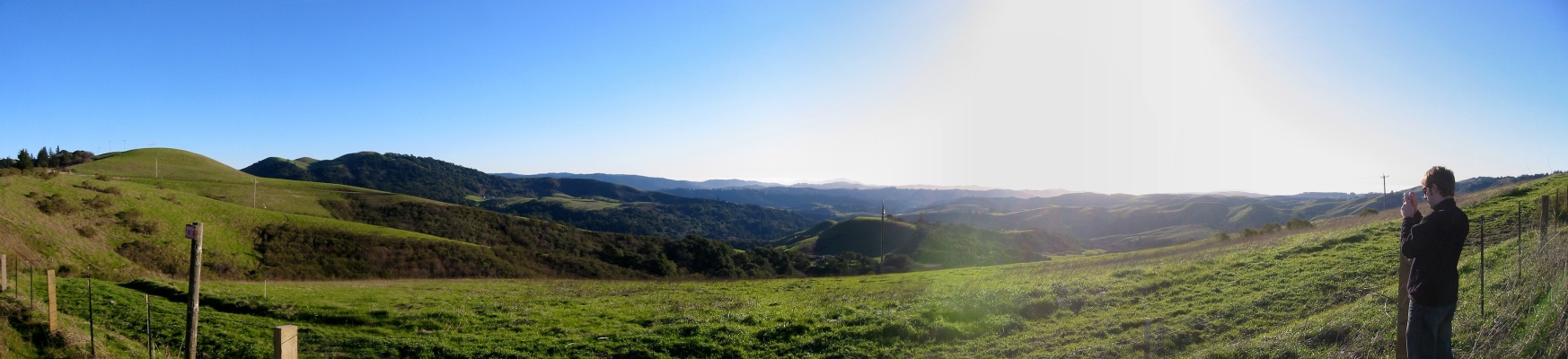
While on a recent trip to San Francisco, I took about 400 photos with my digital camera. A few of these were adjacent shots intented to be stitched together with panoramic photo software.

All kinds of software packages are available to stitch photos together into panoramas. My friend Nathan recomended a package called Panorama Factory, and it is impressive. My camera (nothing high-end, it’s a 2MP Canon Digital Elph S330) includes a feature to help line up multiple shots for a panorama, but Panorama Factory is good enough that you don’t even need to use the camera aids (though I still did for the photos below).

These aren’t meant to be particularly good photos. As you can see by my photo gallery, I’m no photographer. However, I do manage to luck out and catch a few nice ones now and then (getting up at sun-rise always helps, as with this set from the North shore of Prince Edward Island). I thought I would post a few photos to show how easy it is to put together panoramas, to encourage others to try it out, and to point out the great software package I’ve been using (Panorama Factory).

Each of the files below are simple partial panoramas, but Panorama Factory is just as good with complete 360° panoramas. As I show below, it can export to flat images (JPEGs) or create QuickTime panoramas (it also exports to a few other proprietary panoramic formats).

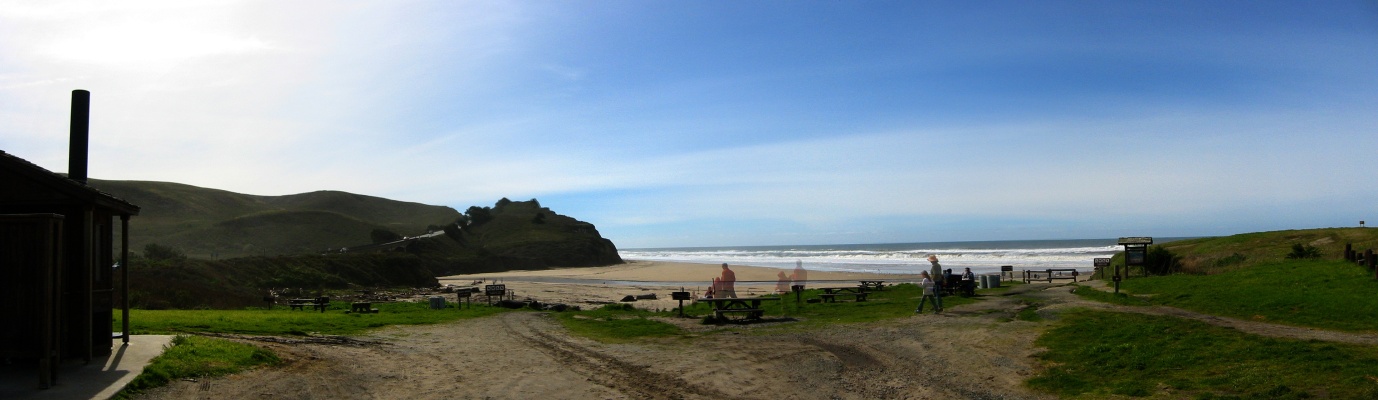
Pacific Beach Panorama

A pitstop on the way from San Francisco to Monterey.
Pacific Ocean Panorama

One of the most beautiful landscapes I have ever seen (not really captured well here) – taken from the hills outside of San Francisco looking towards the Pacific ocean. As an added bonus, that’s the president of the internet on the right.
San Francisco Hills Panorama

A view of silicon valley from the hills – I’m not actually sure where we are at this point. That’s Stephen DesRoches on the right who was all about gettin’ the shots.
San Francisco Hills Panorama

Another shot from the same vantage point as the photo above. This one was with 3-times zoom.
 

Steve Martin’s Script Notes on “The Passion”


Echo Hatchback Fuel Efficiency Correction

Back in August of 2003, I wrote about my new Echo Hatchback and how it’s fuel effeciency was surprisingly good when compared to hybrid vehicles (and way cheaper). It turns out I was comparing miles per US gallon with miles per Imperial gallon.

A unit conversion problem caused the crash of a NASA Mars orbiter, so hopefully you’ll cut me some slack. I’ve updated the original post with the appropriate figures and added a note explaining the mistake and the change.

While the accurate data does put the Echo Hatchback further from the hybrids than my original (bad) data, I think it’s close enough that my original point still stands.

Thanks to the reader who pointed this out and sorry for the confusion.


Me and my shaggy-haired posse at Yahoo!


George Bush – He’ll cut you! (RealVideo) – a great parody ad from Rick Mercer’s Monday Report


Monday Night on CBC Television

Though I’ve been known in the past as the annoying guy who frequently mentions that that he doesn’t own a tv, I got a TV for Christmas (and even bought myself a GameCube to go with it). I’ve since been enjoying some fine CBC TV.

8:00PM — Rick Mercer’s Monday Report
Sure, maybe it’s a Canadian knock-off of John Stuart’s Daily Show, but it’s still pretty funny. The highlight so far is definitely Celebrity Winter Advice with Geddy Lee (of Rush). The bits by the young “correspondent” Darren Jones is great.
8:30PM — The Newsroom
As deadpan as deadpan can be — and co-produced with Showcase TV — so it must be good. You’ll either love it or hate it. I love it.
9:00PM — This is Wonderland
A great new comedy/drama set that follows a new legal-aid lawyer in a city courthouse. As I’ve stated before, I assume all TV shows suck until proven otherwise — this show does not suck.
 

Download video of speakers/sessions from the PopTech! conference from last year – these have probably been up for a while, but still worth watching


A moving three-part Flash Mario Brothers epic: part 1, part 2, part 3.


Learning to Love the Command Line

Having been living in Linux for a while (and to a lesser extent, Mac OS X), I’ve had to learn a bit about the ways of the command line. As someone who’s only other experience with a command line interface was with DOS (with which I was about as adept as one could be), I was skeptical of the value of the command line interface, and reluctant to learn.

That said, I have come to learn that while a command line interface makes it difficult to discover what options are available to you, it does come with some inherent advantages. While I’m certainly not willing to give up my graphical user interface for a text-based console any time soon, I have learned to keep a terminal window handy while using both Gnome/Linux and Mac OS X for a few particularly handy tools.

While these tips are probably absurdly obvious to many people, I suspect there are also plenty of people like myself, web developers in particular, that were raised in Window 3.1-through-95 or Mac OS Classic that never ventured near a command line (except maybe to play Commander Keen now and then).

WGET
Usage: wget [-options] [location]
Example: wget http://domain.com/filename.ext

Occasionally I’ll come across a page with an embedded media file, like a QuickTime movie, that I would like to download. QuickTime doesn’t let me save things locally, so I view the HTML source of the page and sniff out the URL of the movie. However, with some file types, depending on how you have your browser and media applications setup, if you paste the direct URL of a media file into the browser, it will load the file in the media player — again, sometimes without any “Save” functionality. If I’m not too annoyed and frustrated to give up trying to download that butt-finger-sniffing-monkey video by now, I would actually have to open a text editor, create a quick HTML file that included a text link with the URL of the item I want to download. Then, I would save the HTML file, open it in a browser, right-click on the link, and choose “Save As…”. Good lord!

With WGET, as long as you have the URL of an item, you can download it. Just type wget followed by the URL.

For bonus points, WGET can resume downloads and supports any kind of downloading option you might need: gzip encoding, SSL, http-authentification.

WHOIS
Usage: whois [domain]
Example: whois www.actsofvolition.com

Who is indeed. When you’re trying to figure out a human name or address behind some evil scheming website (or just checking DNS info for a domain), the WHOIS domain database has your info. I used to use, and suspect many people rely on, sites that offer a web-based interface to the WHOIS database (Register.com, Userland, etc.). It usually faster to to open up a terminal and type whois domain.com. No anoying banner ads, and the results are in a simple text format — which you can even save into a file using…

Piping | Rules

The real power of the command line starts to become apparent when you realize the power of piping. Piping is a simple means of passing output from one program as input into another. For example, to list the contents of a directory, I would type ls. I can search the results of that directory by passing the list of contents into a search tool, grep. ls | grep spaceman will return any files in the directory containing “spaceman” in their name. Similarly, I can pass the results of a WHOIS query into my text editor (GEdit) by typeing whois actsofvolition.com | gedit, or save the results directly into a file using the redirection feature “>” (whois actsofvolition.com > aovinfo.txt).

This saved me a load of time last week when I wanted to create a chart displaying the sizes of the various components and packages included in the Fedora Linux distribution. First, I needed a list of the file sizes of packages, so I ran ls *.rpm -l > filesizes.txt on the install CDs. This created a text file with the packages names and their file size which I could then open in a spreadsheet application, sort by size, and graph to my heart’s content.

All of this said, I still love a good icon.
 

Acts of Volition Radio F.A.Q.

I’ve been getting quite a few emails asking about various aspects of Acts of Volition Radio. Also, I’ve been glad to see that a few other sites seems to have taken to the voice-annotated downloadable compilation format (LugRadio and Mathcaddy Radio). Whether or not it was inspired by this humble site, I’m glad to see it.

Here, then, is my attempt to answer some of the more common questions about producing a downloadable radio show.

What hardware do you use to record Acts of Volition Radio?

I have a Shure SM57 microphone that I bought in the hope of doing some home recording. It’s a relatively cheap microphone that works well for voice or instruments (particularly guitar amps). It costs about $150. I plug the mic straight into the soundcard on my IBM ThinkPad T30. However, I think I could get better quality with a pre-amp of some kind — instead, I just jack up the signal in the recording software (probably to the detriment of audio quality). A good mic-stand helps too.

What software do you use to record Acts of Volition Radio?

I use a windows shareware multi-track recording package called N-Track Studio. It’s not very polished, but it was really cheap ($45) and does what I need. I think N-Track Studio is to ProTools (or other pro audio software) what Paint Shop Pro (or maybe more like LView) is to PhotoShop — the much cheaper, much less polished little brother that does 90% of what the pro software does.

Why don’t you use GarageBand?

I probably would if I used a Mac. It looks like a good piece of software that would do everything I need (multi-tracking, volume envelopes, etc.).

Why release the show as one MP3, rather than individual MP3 files?

I release the show as one mixed-down MP3 because that seems to me to be the easiest way to release a collection of songs with voice annotation at a reasonable quality. There doesn’t seem to be a decent way to release a collection of tracks together (another argument for an album file format). I could release a zip file with a collection of MP3s and an M3U playlist — but this would limit where it could be easily played, add extra complication, and limit control over the flow of the show. I do occasionally talk of the fading in/out beginning or end of some of the tracks.

I also see the show I’m putting together as a peice of work in of itself. I’m adding value by collecting tracks and adding my thoughts and impressions. The result is one unit of work. Yes, it’s a pain that you can’t skip ahead a track (of course, you can always manually jog through the track), but I think this is a reasonable trade-off.

While I suspect that keeping the show as one file does make what I’m doing a bit more palatable to the music industry, as it is a bit more difficult for what I release to end up as individual tracks on file-sharing networks, this isn’t why I do it in this format. I’ve never thought crippling features or tying the hands of the user (listener) was a good means of protecting work — but rather it is usually a symptom of broken law and regulation.

Is Acts of Volition Radio Legal?

Kinda, sorta, not really… When I first started, I emailed SOCAN (Society of Composers, Authors & Music Publishers of Canada). SOCAN is kind of like ASCAP here in Canada — they handle the licensing of music for radio and the compensation of artists. I got an informative and timely reply that explained, that:

“SOCAN is not yet issuing licenses for the communication of musical works in Canada over the Internet. As such, there are no rate cards nor is there a set form that you are required to fill out. However, when the Copyright Board approves a tariff applicable to your business (tariff 22), SOCAN will require that you pay all applicable fees and taxes retroactive to the commencement date of your business.”

To avoid any copyright infringement legal issues, I was advised to send a letter to SOCAN stating that “my company” (I guess that means me) agrees to pay any taxes and fees retroactively once the rates and laws are sorted out. Apparently a typical fee for this type of licensing in other medium runs around $0.25 “per subscriber” — but I’m not sure the “subscriber” model really holds up in a downloadable format.

I do get the impression that the downloadable nature of Acts of Volition Radio is particularly beyond the understanding the legal system to address so far.

Basically, they haven’t quite figured it out yet. I decided not to sit on my hands and wait for policy to catch up with culture and technology. I’ll do my best to follow the laws and pay any appropriate fees when they are finally sorted out.

How much bandwidth does it take? How do you pay for it?

Not a whole lot. The show isn’t so popular that it runs up too much bandwidth usage. For example, Session Six was downloaded about 400 times in February. Also, I’m a partner in a web development firm and I’m able to piggy-back on some of the hosting/bandwidth resources available to me there. After taking a quick scan of some web-hosting sites, I see that you can get 45GB of traffic for under $15/month — not bad.