This month in WIRED Magazine’s Wired/Tired/Expired:
| Wired | Firefox |
| Tired | Mozilla |
| Expired | Explorer |
This month in WIRED Magazine’s Wired/Tired/Expired:
| Wired | Firefox |
| Tired | Mozilla |
| Expired | Explorer |
Where I’ve been in the last 12 months

I’ve written a review of the McSweeney’s book, The Future Dictionary of America, and the accompanying CD, Future Soundtrack for America.
As I state in the review, I’m a bit creeped-out by the politics and slightly-too-hip-ness of it all. That said, this is a good CD.
Here’s a sample definition from The Future Dictionary of America:
seven dollar socialist [$7 soh’-shul-ist] n. an activist, usually found in wealthy, liberal cities like San Francisco, whose high tax bracket income affords him or her the luxury of their rabid, liberal views. Ex.: an Ipod-carrying, Jetta-driving, organic-tomato-eating protester waving a placard reading Socialism Now while waiting in line to buy a $7 sandwich at Bi-Rite. – NOAH HAWLEY
A kindly office-mate commented that with the twelfth session of Acts of Volition Radio, it has crossed the threshold of novelty. It is now all about the music and commentary, not so self-conscious about being a new medium. Perhaps like when webloggers stop talking about weblogs and just start talking to each other. Nice.
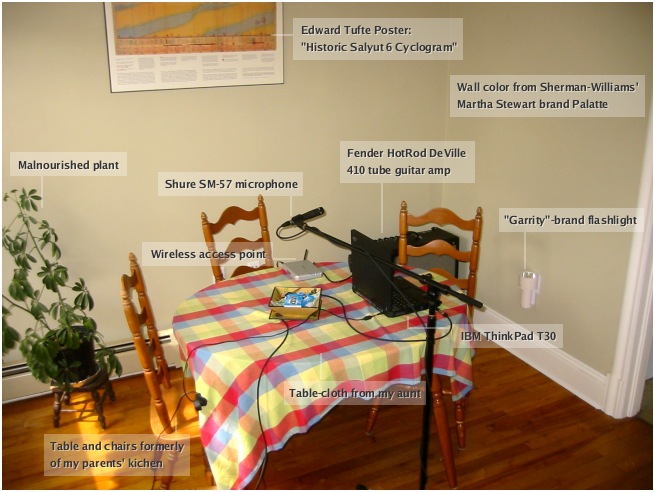
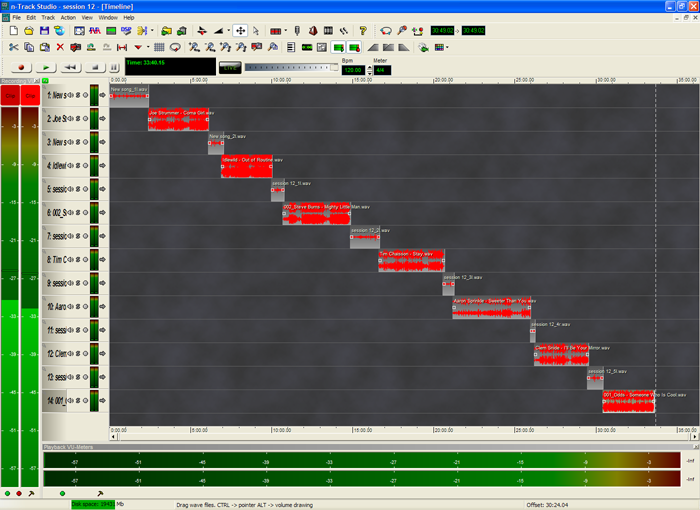
Here then, keeping the novelty alive, is not so much a behind-the-scenes look as a photo of my kitchen table where I sometimes record Acts of Volition Radio. Also, here is what an almost-finished session looks like in my audio editing program.
For an actually behind-the-scenes kind of look, see the Acts of Volition Radio Frequently Asked Questions.
 In the twelveth installement of Acts of Volition Radio, I draw heavily on a mix by my friend Dennis Arsenault. Also, thanks to Timothy Chaisson for permission to include his track.
Session Twelve Playlist:
For more, see the previous Acts of Volition Radio sessions.

The marvelous Wikipedia has a collection of the origins of company names. A few that I found interesting (all quoted from the Wikipedia page):
For those who might wonder, silverorange is named after its founder, Sir. Herbert Silver Bertrand Orange, III, Esq.

The team at silverorange has been working on a redesign of the mozilla.org website. We’re keeping most of the content as it is (especially historical content, like documentation, etc.). We have a new visual template and redesigned some of the key top-level pages. We call the new style: Cavendish
Please take a look through the site with your favourite web browser and post any issues/bugs on this MozillaZine thread. We’re most concerned about technical issues and bugs (rendering problems, etc.).
See the website beta now at website-beta.mozilla.org and post feedback on this MozillaZine thread.
This is still a beta, so there are some outstanding issues. Some in particular that we’re aware of (so don’t bother pointing them out):
Aesthetic feedback is welcome, but we reserve the right to respectfully ignore it. We have no illusions of being able to please everyone. Rather, we’re aiming for a clean, simple, and professional overall look and feel.
Will Farrell as George Bush causes me to pee my pants
Not really an original thought, but a thought none the less, it occurred to me this week that some of the primary sponsors of the Olympic games are pushing products that actual Olympic athletes could never actually use.
Do you think someone setting a world track-and-field record would have been allowed to have a Coke and Big Mac in the last five years? No.
silverorange is five years old today