Sitting by the pool-side at a friends’ place while in Toronto last week, there were a load of wireless networks available:

Of course, none of them worked.
Side-note: wireless used to suck on Linux. Not anymore.
Sitting by the pool-side at a friends’ place while in Toronto last week, there were a load of wireless networks available:
Of course, none of them worked.
Side-note: wireless used to suck on Linux. Not anymore.

In the summer at CBC Radio One, it seems everyone leaves and they give Sean Cullen, goofy Canadian comic extraordinaire, run the studio on Saturday mornings with his show Simple Seán (note the accent on the ‘a’).
He rambles like an idiot for a few minutes. First you’ll think, How can they let this fool on the air? Next, you’ll be laughing out loud. This will repeat throughout the show.
Then, for some reason quite surprising, Sean plays fantastic music. Today he played Joel Plaskett, The Deers, the Mountain Goats, the New Pornographers, Sloan, Broken Social Scene, the Stills and a few other goodies.
A good listen – Saturday mornings on CBC Radio 1 through out the summer.

The day after Canada Day, I put together a new session of Acts of Volition Radio.
Session Twenty Five Playlist:
For more, see the previous Acts of Volition Radio sessions or subscribe to the Acts of Volition Radio RSS feed.

Cover of the new Keane album is very cool – has kind of a great wave thing going on.
This is the first non-sarcastic reference to Web 3.0 I’ve seen in the wild
My first article for Wikinews was published quickly. Cool! (oh, yeah, and there is bird flu on PEI)
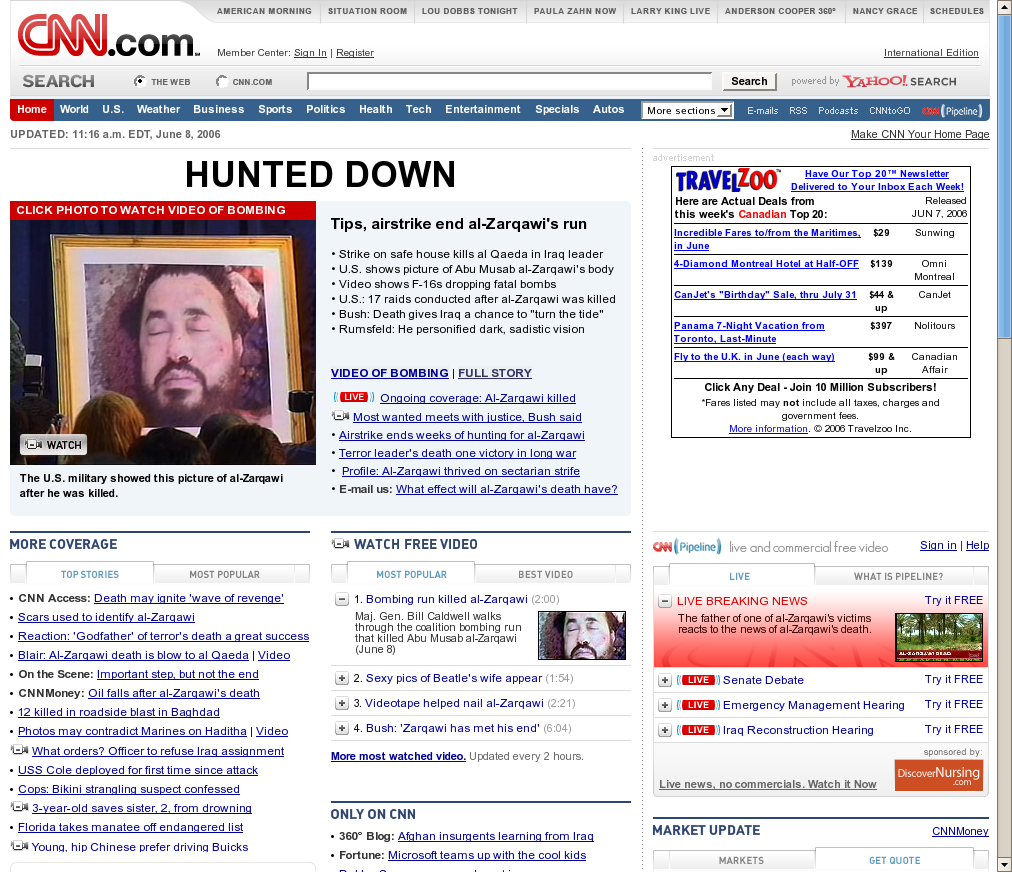
The media is a buzz today with the news of the killing of Abu Musab al-Zarqawi in Iraq. I have no doubt that he was a bad dude. However, it’s worth taking a look at how this is being presented and covered.
See this screenshot of the CNN.com US home page. Note that they went to the trouble of framing and matting photo. I can only assume that some framing shop in Washington D.C. got a call from a Whitehouse aide with the weirdest rush-job they’ve ever had.
For bonus points, you can click the photos of the dead man to watch video of the actual bombing that killed him.
We’re getting pretty used to this kind of media presentation by the US government. It’s worth stepping back and taking a look at how absurd things have become. They framed it. Are they going to hang it up in a dining room?
| Col 1 | Col 2 | Col 3 | Col 4 | |
|---|---|---|---|---|
| Row A | 1A | 2A | 3A | 4A |
| Row B | 1B | 2B | 3B | 4B |
| Row C | 1C | 2C | 3C | 4C |
| Row D | 1D | 2D | 3D | 4D |
A random tip, because I find it so handy on rare occasions:
You can select columns, rows, or blocks of cells in HTML tables in Firefox (or any Gecko-powered browser) by holding down “Control” and
selecting with the mouse. Handy for copy+pasting data from tables in websites.
Try it out in the table to the right.
Our local Canadian member of parliament on the descision to stay in Afganistan to two more years.
I’ve got what is clearly a brilliant idea.
A sit-com/drama (a dramady?) about a doctor who, when push comes to shove, is the decider. It’s ER meets Scrubs meets The West Wing meets Commander in Chief meets Grays Anatomy meets Scarborough Country.
I call it, George “W”, M.D.
I wonder if I can get Ian Williams to write the pilot…

