I might start initiating conversations the way the Canada Revenue Agency does in its emails:
“Don’t respond to this, but …”
I might start initiating conversations the way the Canada Revenue Agency does in its emails:
“Don’t respond to this, but …”
I took a spin in a time machine this morning. I jumped seven years into the future and what I saw was chilling.
Everywhere I looked Web developers were working diligently to remove React as dependency from their Web projects.
During a discussion with Kara Swisher on the Recode Decode podcast, Ezra Klein said:
“[Time] creates space where judgement can creep in.”
— Ezra Klein on the Recode Decode podcast
Ezra was speaking about the pace of the journalistic process. While he enjoys the immediacy of blogging, he has learned to value the more measured process of a larger organization, which allows room for, as he says, judgement to creep in.
This echoes a sense I have when it comes to making most healthy decisions. Even a tiny bit of time can be enough to allow my slower, smarter, self to outsmart my fast, stupid, and selfish lizard brain.
Imagine a refrigerator with a five-second delay when opening the door. I’d wait if I really wanted or needed something, but if I was just mindlessly grazing for a snack I’m not even hungry for, it might be enough to stop me.
Time can also create space for poor judgement. When something on our computers takes a few seconds too long, these extra moments can be just enough for us to trigger our “let’s check the Internet for something new” impulse.
I have a complicated relationship with Christmas music. For the most part, I don’t like it. That said, there are a few Christmas classics that I do enjoy. Over a decade ago, I even assembled an episode of my (currently hibernating) music podcast dedicated to Christmas songs.
I also see how much joy my kids get from Christmas music. They love it, and I love that they love it.
I noticed a few songs that I wouldn’t quite categorize as “Christmas music”, but that are “Christmas adjacent”, or even just “holiday adjacent”. The two that come to mind are Non-believer by Joel Plaskett, and River by Joni Mitchell.
River is pretty close to being a full-blown Christmas song. She does repeat the refrain, “Merry Christmas…”. Plaskett’s Non-believer is better example of ‘Christmas adjacent’, as it’s not about Christmas, but alludes to Christmas Eve and carols in one of the verses.
‘Christmas adjacent’ music feels particularly appropriate in December, but isn’t completely out of place during the rest of the year.
Any other good examples?
We should all be able to find as much joy in the world as Brian May of Queen does in Nuno Bettencourt’s guitar solo in Extreme’s Get the Funk Out.
Back in the early 90s, Greco’s marketing team asked the age-old question: “If you’re not eating square pizza, who’s eating your corners!?“
A variation on the same question came to mind this morning when looking at the Google.com search home page:
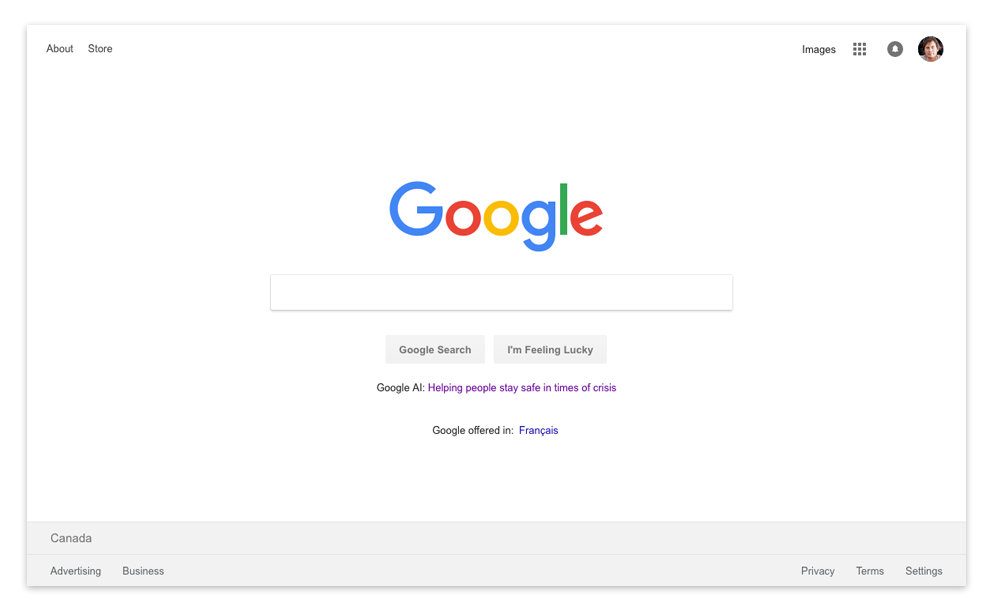
First, your version of the Google home page you see is likely different from what I see. I’m logged in to a Google account. I’m also in Canada. Who knows what else determines what Google shows me.
Notice the four corners of that screenshot. Year over year, they seem to be filling with a creeping set of links and features. There’s an inscrutable grid of nine squares, a circle with a bell in it, a links – more and more links.
To be fair, it’s still a relatively simple and clear page. The search is the obvious focus – something that’s not as easy to maintain as it may sound. The secondary focus seems to be showing how Google’s artificial intelligence efforts are helping people. OK.
Even with this relative austerity of interface elements, I can’t help but see these creeping links and features as metaphor for a muddying of focus with which any company operating at the scope and scale of Google must contend.
It’s also worth noting that almost every link on that page (About, Store, Images, Privacy, Advertising, etc.) all take you to different websites with completely different navigation and interface structures.
Oh, and at risk of being “that person”, I mostly use DuckDuckGo for search these days.
The Web agency I have been helping to build for the past nineteen years is looking to hire a Quality Assurance Analyst:
[…] Over the nineteen years of growing silverorange we’ve focused as much on quality of life, openness, empathy, and a wonderful work environment, as we have on our dedication to building great user-focused systems.
Our team benefits from those with over a decade of shared experience and has only become stronger with the eight amazing people who’ve joined in the last four years.
We’re looking for a junior-to-intermediate Quality Assurance Analyst to join our team in order to help us improve our testing and QA infrastructure.
As an applicant, if you have either a programming background and a real passion for testing, or you are an experienced QA tester looking to build your technical skills, this position is for you. We will provide mentoring, support, and learning opportunities to help you expand your skills.
Your first task will be writing end-to-end test cases for a fantastic long-term client.
Applications close January 7th, 2019, at which point we’ll be in touch with only those people we shortlist for interviews. This position is available immediately and we will work with you to get you started as soon as possible. […]
silverorange Quality Assurance Analyst job listing
The full job listing explains the position and the company well. If you know someone who might be interested, please let them know. We’re particularly interested in getting the word out to those in under-represented communities.
It is a truly great team to work with.
When looking for a brief distraction, I still have web-muscle-memory that takes me to Digg.com. Though the site has changed completely from its time as the post-Slashdot/pre-Reddit community-powered news site, it’s still kind of fun.
The best part of the site, by far, is the tiny little taglines posted above each story headline. Somewhere, there is a person or group of people working away tirelessly to tag each story with a little quip that I always enjoy.
Here are a few examples from today’s Digg.com front page:
On the story, The Quest To Beat ‘Super Mario Bros. 3’ As Fast As Possible… Without Warping“, the tagline reads, TANOOKI SUIT UP.
On the story, We’re Losing Our Marbles Over This 11,000-Marble-Deep Marble Run, the tagline reads, THE ONLY THING TO SPHERE IS SPHERE ITSELF.
On the story, Huge Dog And Mini Horse Are The Cutest Best Friend Pair You’ll See All Week, the tagline reads simple, GIDDY UP.
Sometimes they editorialize, as on the story Why It’s Time We All Became Climate Change Optimists, where the tagline reads, WE’RE ALL GONNA DIE ANYWAY.
Sometimes they go terribly punny, as on the story Chinese Scientist Claims He’s Created World’s First Gene-Edited Babies, where the tagline reads, GATTACA-N YOU BELIEVE IT?
There are times when you can almost see them throwing up their hands in defeat, as on the story Here’s How Long It’d Take You To Poop A Lego, where the tagline reads only OKAY.
Thanks, digg.com-tagline-writer-people. We see you.
Beware of software that includes the name of its programming language in its name. This belies a focus on implementation details over the experience of using the software. Of course, exceptions abound.

This video tour of the history of mouse cursors by Michiel de Boer is oddly delightful. Apple or Microsoft should give Michiel a bucket of money to make their cursors better.