What happens when you put a bunch of webloggers in a barn with beer and pizza? We’ll know tomorrow night.
Author: Steven Garrity
Tim O’Reilly’s wishlist for 2004
The Mozilla Foundation is looking for a web developer to help with a few projects
The latest update to open-source instant messaging client, Gaim 0.75 is released – it’s the first time I’ve had my name in a ChangeLog – cool!
Alan McLeod totally captured that horrible freezing crunchy snow sound on video (shudder)
Audio interview with Tim Berners-Lee (8.2MB MP3)
Linky: A great extension for Mozilla Firebird
One of the many great things about the Mozilla Firebird web browser (go get it now if you aren’t using it), is a decision the developers made early in the project. In order to keep the application simple, fast, and elegant — any features that aren’t essential or may be limited in appeal to a fringe group of users are not included in the browser. Rather, they have made it easy to build (and easy to install) add-ons to the program, called Extensions.
 With this simple decision, the Mozilla Firebird team has managed to avoid one of the great pitfalls of open source development — creaping featuritis. Whenever someone asks for a new feature, the answer is almost always: that should be an extension (and it usually already is an extension). Extensions can also serve as a test bed for features that may eventually be rolled into the core (under the watchful and discerning collective eye of the core development team).
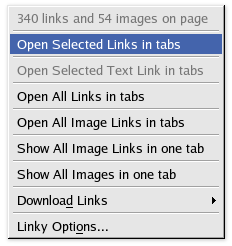
What prompted this ode-to-extensions was an extension that I find particularly useful. Called Linky, this simple extension adds an extra menu item to the context menu when you right-click on a selected portion of a web page. You can select a portion of a page (a paragraph with a few links, a group of linked thumbnail images, or a list of links), right-click, and choose Open Selected Links in Tabs.
This simple feature is a great time-saver (what I’m saving my time up for, I’m not sure).
There over 100 other extensions available as well.
One of the funniest Strongbad Emails in a while (flash)