Sitting by the pool-side at a friends’ place while in Toronto last week, there were a load of wireless networks available:
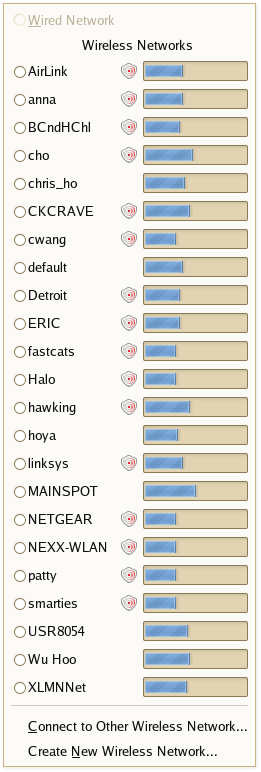
Of course, none of them worked.
Side-note: wireless used to suck on Linux. Not anymore.
Sitting by the pool-side at a friends’ place while in Toronto last week, there were a load of wireless networks available:
Of course, none of them worked.
Side-note: wireless used to suck on Linux. Not anymore.
Comments are closed.
Go Go NetworkManager!
Just curious, how are you taking a screenshot of the menu? The Gnome Screenshot and the Image Magick methods both disrupt open menus before snapping a pic.
I am the friend!
Martey: NetworkManager is indeed awesome.
James: I ran into that same screenshot issue. I used the Gimp instead. File -> Acquire -> Screen Shot. Then, grab the Whole Screen after a few seconds delay. That will give you the menu, which I then cropped out.
Carol Anne is indeed “the friend”. Her can knocks things over.
“Her can knocks things over.”…by the pool?..and you give us a screenshot of wireless networks?!
Wireless networking on Linux doesn’t suck if (a) your distro includes Network Manager (Ubuntu doesn’t, and apt-get didn’t install it properly for me), and (b) you’re not trying to join a silent WPA network, which works perfectly on Mac and Windows but not Linux (unless you know the magic incantation to add to the right magic file, which file is different for every distro).
I’ll try again in 6 months. Linux for me is still like banging my head against the wall… it feels so good when I give up trying to get it to work.
Hi Steve. I’m living in Toronto now and there’s a huge difference from Charlottetown to here. Pretty much EVERYTHING is locked down here. When you do get a connection it’s slow. Where as in Charlottetown, it was all open and fast. Ah, the good ol days.
This is an article about the situation I wrote for a local online magazine.
http://www.gogadzooks.com/episodes/episode22_wireless.htm
Matt:
NetworkManager *does*, in fact, work on Ubuntu. There’s just a trick to it. After installing NetworkManager and the NetworkManager Gnome panel applet packages, you need to edit /etc/network/interfaces and comment out everything that dosen’t have to do with the lo interface. Then, reboot.
It was installed by default on the LiveCD in a bunch of the beta releases. I’m not entirely sure why it was cut out. It’s currently planned to have it setup by default in every future version, though.
Can’t help you with the WPA network thing, though. I don’t know much about WPA. I use a silent WEP network without problems. I’ve heard that some cards have better Linux support then others. Have you tried swapping in a different PCMCIA card to see if it changes things any?
NetworkManager is a godsend. I sold my old laptop yesterday. I installed a fresh Ubuntu Dapper on it, and first thing I did afterward was install NetworkManager.
I never understood the need for the separate Connect to Other Wireless Network… and Create New Wireless Network… menu items. Granted, I’m very sleepy now, but why can’t they be combined?
Ha! I prefer quality (and connectivity) versus quantity, thank you very much. Wish my Airport picked up more WiFi ’round here…
XINERGY
You guys are cramping my “linux wireless works well” style!
Oh, and I meant my friend’s CAT knocks things over – not her can… The shame!
Linux is getting better all the time now. Is like watching dinoaurs evolve in super fast speed (The dinos that survived, that is)
“CAT” as in feline, or “CAT” as in CAT5 (are we still talking about networking here)?
While I have run into the same “silent WPA” issue as Matt, I would like to note that WPA2 works perfectly for me in Linux, despite intractable problems in Windows XP (the Windows update to enable it refused to install!).
Very nice, I too had trouble installing network-manager on Gnome under Ubuntu 6.06 on my iBook. I thought I followed the steps you outlined, then rebooted, but could never connect. Problem is with these things I never know if it’s me, or the fact that I’m on Ubuntu PPC and not x86. Oh well, I’ll try again, and if it fails I’ll just buy that black MacBook that I love so much!