Today we have a lesson in how to screw up a good thing. I’ve been a long-time user of instant messaging. It started with ICQ, and though it was mostly a novelty at the time, it was clear that this was a major shift in online communications. I still use ICQ primarily, but sneaking in as a default install with XP, MSN Messenger was slowing winning me over. I would have switched completely, but the lack of an archive of messages was a deal breaker.
 This was MSN Messenger 4.x. When Messenger 5.0 became available, I updated. It was a mistake. Here’s why.
- Tabs that are really hard to eliminate.
In 4.x, turning off the annoying tabs (that I presume no-one uses) was easy. Go to the Tools menu, and toggle the Show Tabs option. In 5.0, I didn’t think it was possible until I stumbled across an obscure setting in the Privacy tab (?) called “This is a shared computer so don’t display my tabs“. I’m not using a shared computer, but this did exactly what I wanted. - Popup Advertising!
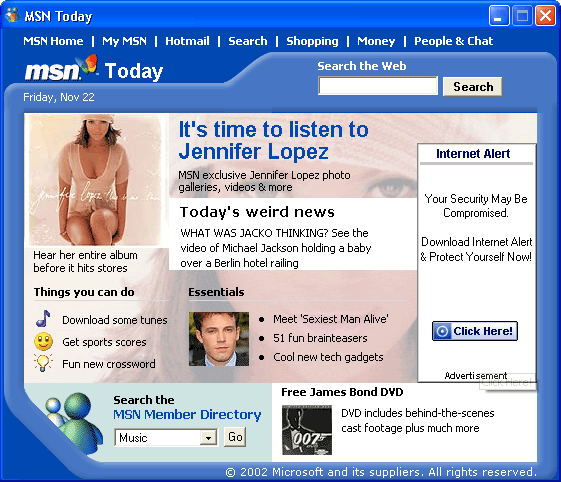
Everyone knows the world is going to hell – old people have been telling us this for centuries. I plan to tell young people this when I get old. However, I didn’t realize how bad it was until Messenger 5.0 gave me pop-up advertising when it loads (screenshot). This is not a trivial annoyance. Consider that for most MSN Messenger users, the program loads at start-up. This means a pop-up ad every time you boot your computer; totally unacceptable. I’ve since learned that you can turn this off by un-checking the “Display MSN Today when Messenger signs in” option; still totally unacceptable. - New sounds.
I’ve always thought the audio in Messenger 4.x was some of the best audio design in any application. The default ‘user-is-online’, ‘message-sent’, and ‘message-received’ sounds were subtle, distinctive, hard-to-miss, and easy-to-ignore. Perfect. The sounds may grow on me, but it feels like the like the new sounds are the audio equivalent of the visual changes between Windows 2000 and Windows XP; from sharp and subtle to soft and a bit garish. Of course, the real test comes in every day use, but for a quick comparison, here are the sounds of both versions (links are WAV files): - Icons – branded to death.
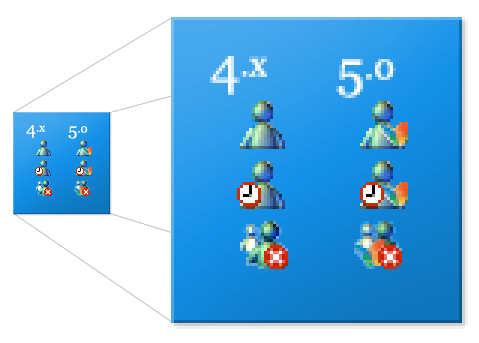
 The icons in Messenger are important, as they are one of the new icons that are always on the screen. The new 5.0 icons include the MSN Butterfly. For the record, I’m not totally anti-butterfly. The full-size MSN Butterfly icon included in system32/shell32.dll in XP is absolutely beautifully rendered. However, the tiny butterfly added to the 16×16 pixel system tray icon is too easily confused with the offline or away status indicators. It is too small to decipher, and just adds clutter.
 - Easy to dismiss items
In 4.x, you could right-click on the alerts (the boxes in the bottom-left corner of the screen that tell you a user has signed-on), and dismiss them quickly. It is an obscure feature, but totally non-intrusive and handy for those who use it. This doesn’t work in 5.0

I’m a confessed upgrade junkie. Sometimes it burns me.
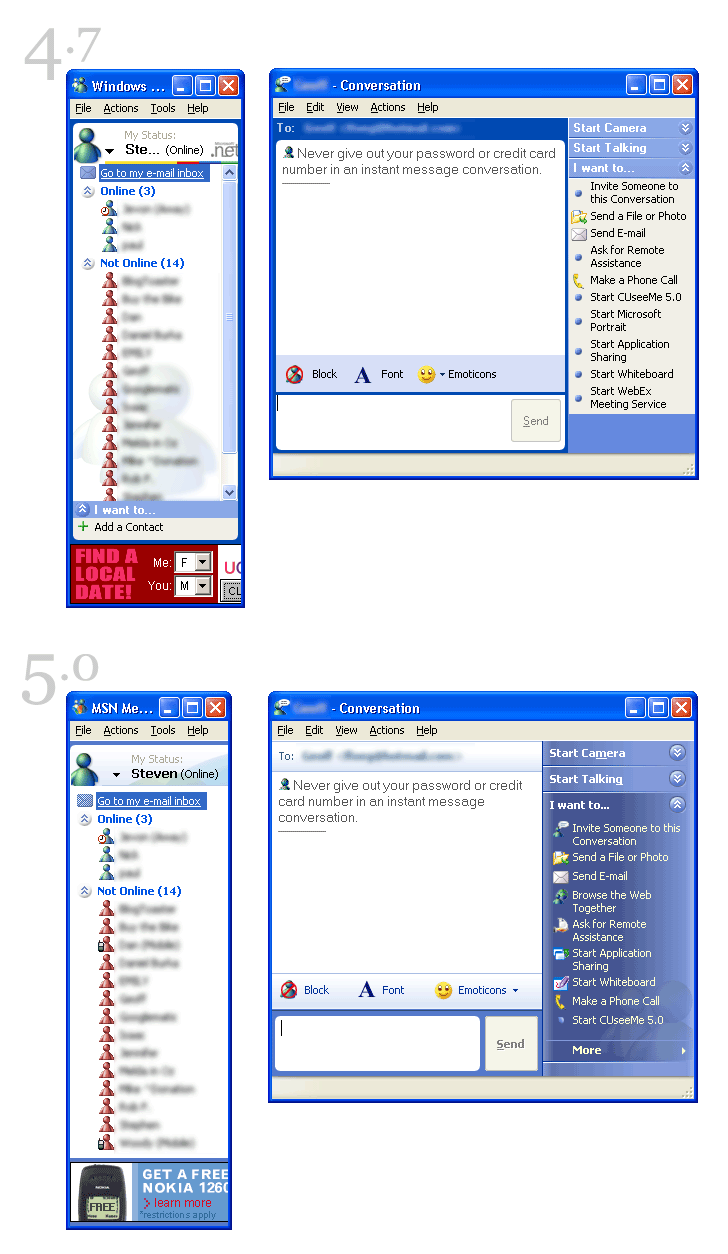
Microsoft’s UI design teams seem to need to implement an entirely different interface scheme for every product line. Take a look at this comparative screenshot of version 4.7 and 5.0 (also note one of the new improvements in v5.0 – the better layout of the My Status area at the top of the Messenger window). Office and XP look different and all of the MSN stuff seems to be happening in a bubble somewhere (a heavily bevelled bubble, I would imagine).
This reminds me of the politics and positioning that takes place between federal, provincial/state, and municipal politics. There is only one tax payer. There is only one user.
A new UI is a lot of the reason people decide to upgrade. Just look at OS X, would it have taken off as much as it had if it was still the classic Mac look? No. Joe Mac wouldn’t have gotten the big importance of Darwin, or Unix, or anything else if it wasn’t Aqua. But, when designers rely too much on getting a new UI for upgraders it gets annoying to old users.
It’s too bad really, that the designers and programmers think that slapping a new interface on and old horse makes it a better application. It usually doesn’t, it’s just cosmetics that englighten users to the flaws of their upgrade.
You nailed this one on the head. I’m guilty of using msn much more recently too but only because it seems faster to use for quick messaging but ICQ remains to have the better features.
History archiving is a big one but being able to send messages when users are offline is even better. I don’t need to open my email to send a simple URL link when I can just open icq and send them that way. It is much easier to send small icq messages rather then a few emails with one or 2 lines in each.
Another thing that ICQ dominates over MSN is that incoming messages appear in the system tray and not a new tab flashing at the bottom of my screen (a new one for each user).
For the past year and a half I’ve come close to typing more words using various instant messagers than I have spoken works on the telephone (or, shockingly, in person). I started the year as a diehard Jabber user, with occasional use of MSN Messenger (version 3, under Windows 2000).
Since Apple released Jaguar (aka Mac OS 10.2), I’ve switch entirely to using the integrated iChat application, which uses AOL’s protocols and thus allows me to communicate seamlessly with both AIM and iChat users.
iChat is a very nice application: it’s fast, it stays out of the way when you don’t need it, there’s no pop-up advertising of any sort, and it doesn’t try to be an MSN-style “connect with cell phones and buy things the MSN Shopping Channel” uber-app. Even the cartoony “bubbles” that I initially thought I’d turn off (you can make iChat look like a regular IM via Preferences setting) become addictive and make following IM chats easier.
I, too, was an early adopter of ICQ, and got a few friends and relatives going just for kicks — even rudimentary voice over IP. That was four years ago. Somehow I lost interest in IM and never regained it.
But [my] children are another story. They run AIM and MSN Messenger constantly and know every nuance, technical and commercial. There’s an adult growth edge for IM — newly online grandmothers drunk on the InterWeb, I guess — but the major IM platform-providers only underwrite it as a marketing vehicle. If there’s downward pressure on email spam there’s none on IM spam. Users clearly opt-in; the resources expended are more clearly owned by the IM provider.
IM, then, will saturate with commerce and those inured to it, and probably won’t interest me. Too bad: it’s a clever technology. Maybe Jabber (and AOL/MSN over-reach) will propel IM into an understood public realm, where users are thought to have discretionary rights. For now, I think, it’s just noise getting noisier.
IM is not ours, it’s theirs. They mean to keep it.
There appears to be two version of messenger for 2000/XP for download. I seem to have one that has no ads, and has no upgrade avail for it. I have been confused over the last few days, as I did not get the upgrade (I am an upgrade junkie as well).
That being said, iChat is king for me. It will be interesting to see how apple goes about adding video conferencing and VOIP to it in the near future. I’m sure they will be very careful.
I’ll add my name to the iChat list for obvious reasons. That said, before iChat I was a big fan of Proteus, which allowed me to manage all those bloody IMers in one convient package. But I’m with Jevon, the sooner Apple fufills the promise… video/audio/ipbased devices… the better.
Well done list. One of the things that frustrated me was the lack of any new features. The “MSN Today” popup is not a feature. All I wanted was to be able to right click on the systray icon, select “Send an Instant Message” and then select online users from a submenu rather than from a popup.
The feature I’ve been waiting for is the ability to check email POP accounts the same way Messenger can check Hotmail accounts. The way it displays who it’s from and the subject in the little subtle popup from your system tray is great.
I can’t be the only person here that’s familiar with Trillian. I get lost in tech talk after a sentence or two, but I can tell Trillian is a decent program. It lets you use AOLIM, MSN, ICQ, IRC and Yahoo accounts all in the same interface, with one contact list. It look more like IM than anything else, but the basic skin is clean and easy to use. It also lets you check your various email accounts with it. I got it 3 months ago and I’m hooked.
Ben, I’m running Trillian as well. Aside from having a cool name, it is indeed a fine program (though I’m not into the skins). I use it to bridge to AOL Instant Messenger, but I’m looking forward to the ICQ/AIM linkup so that won’t be necessary.
I use Windows Messenger, the one that comes with Windows XP. After installing XP on release a month later Windows Messenger told me an upgrade was available for download, so I got it. Know what? It no longer told me when new mail was in my hotmail inbox, I could no longer click the link at the top to goto my inbox. It told me I had to download an addon pack for them features, so I did. Now before I move on, I don’t like advertisements built into my messenger especially when I pay a lot of money for an operation system that comes loaded with my messenger of choice. Now, after downloading the add on pack, guess what… my Windows Messenger had advertisements on it, just like the free downloadable MSN Messenger. To this day, I have yet to upgrade any Microsoft application, and I never will unless I use it at a friends place first. Whats next? a new version on Internet Explorer with build in flash ads showing off Office onenote before I can go to a web site?
i couldn’t agree more. i promptly deleted msgr5 a few mins after i installed it. msgr plus doesn’t work on it yet either, so even if i liked the changes, i couldn’t create log files of chats.
I’ve been quite pleased with Trillian (thought not enough to give up on MSN and ICQ completely). Has anyone tried the Pro version of Trillian? Looks promising (it can check email).
Trillian user for 2 days… and happy. It has the features I like about ICQ
plus the interface is pretty simple, especially with the Windows XP skin.
The email checking plugin is available in the pro version and the inegration of my MSN users with my ICQ users is great. I’m going to keep using it for a few more weeks and then maybe buy the pro version.
An off-topic I know, but if you are an active IM Windows user and have never seen iChat on OSX, you really should check it out. In my mind, it is the perfect IM app. Seamless integration, stays out of the way, and ZERO advertisements or click-throughs to MSN-style news items and other crap.
Todd, I tried out iChat on the mac at work and, though you really have use an IM client for some time to really judge it, my first impressions were positive. I especially like the ability to show a user’s photo with they’re text (with or without the speech-bubbles). This is a technique we use on our corporate intranet at work.
Thanks for the tip on the tabs, the tab thing annoyed the hell out of me too.
One major problem with Messenger is that it bugs you so often about upgrades. I used to say no on upgrades, but I got tired of saying “no” about two upgrades ago, and just do it pretty much automatically now. Now I’m stuck with 5.whatever that I don’t like. MS forced upgrade path.
Trillian is good, but has its issues. It’s not 100% compatible (yet) with all the protocols (I get contact list issues on ICQ where people don’t show when they should) and at times seems to have a lowest common denominator approach to what you can do (ICQ has very fine grained privacy controls). The mail indicators aren’t as smart, but all of the above can be fixed in future versions.
The biggest problem with Trillian is fundamental to it’s design. It’s the way it handles skinning. It’s not just appearance skins – which can be bad enough trying to explain what to do when the appearance is unknown up to a point – but skins that change the way the app operates. I hate that, it’s behavior is inconsistent, it depends on what skin you run. There are buttons that only exist in certain skins. There are certain actions that can only be done in certain skins. So now, instead of just downloading the app, I have to see which skin I like to see what actions I like taking. I’ve only downloaded the .74 version, I don’t know how skins are with upward compatibility. Mozilla and it’s XUL chrome have a lot of the same probblems, but they actually seem more consistent in design (though that’s probably mostly by luck at this point).
Rich: Youre right on in your assessment on Trillian. Since making this post, Ive purchased the pro version. Im pleased with it in some respects, but the skinning, which works exactly as youve described it, is terrible. It took me forever to figure out that some of the features weren’t available in some skins. I was completely confused. For anyone else upgrading to the pro version, Windows XP Pro was by far the best and simplest skin I could find. As I’ve been saying for two years now: I hate skins.
It is an extremely configurable application. This sounds like a good thing, but consider this: I didnt change ANY settings while I used MSN Messenger it was all default. Trillian took me over an hour to get configured to a point that I was happy with it, and Im still finding other settings I need to change. I doubt many people will be willing invest that kind of time.
That said, I do have it working well now, and I will continue to run it as my primary IM client.
I mentioned above that “Microsoft’s UI design teams seem to need to implement an entirely different interface scheme for every product line.”
They’re at it again. This time the Office division is reinventing the visual style of the interface. See screenshots from the Office 11 beta.
Simon Willison adds a few more good points about Messenger 5.
Hi,
Just one gripe as a messenger 4.x user who refuses to upgrade: the “WOULD YOU LIKE TO UPGRADE?” prompt can never be permanently shut off. At most, you can ask it not to ask you for a week.
Every week, the same routine. Why won’t they just leave me alone?
The main problem with MSN Messenger 5.0 is that the object hierarchy is no longer exposed, limiting the extensibility of the software.
God rid of the tabs, disabled msn today, replaced the sounds with the ones I downloaded here. Thanks man!
does anyone have a mirror for me to download 4.x? =)
I am having a problem with my MSN Messenger connection. I am not understanding what should go in the “Realm” catagory when fixing the HTTP proxy. I have had administrators try to figure it out and no one can. Can some one please give me an example or explain what is it that needs to go there in order to make it work.
I seriously don’t know why you guys bother with MSN Messenger or even Trillian for that matter.
They both shit me to shreds, no tabbed messages make tom goo craaazzyyyy. Get gaim, get enlightened, feel the freedom 🙂 http://gaim.sourceforge.net/
I am bothered by the fact that the old version of MSN messenger still stays in your tray for ever after you upgrade. All it does is sit unused wasting resources and refusing to close.
Messenger 5.0 is no good it will not stat connected.
msn plus! (add-on/patcher, releases the missing usability features, blocks the ads, and adds configurable kb shortcuts)
There’s something really wrong with my computer, everything is just freezing sometimes and when I sign up to msn, it doesn’t search what I’m searching for. I have to go to school and do my homework and I usually use the internet for this but now that it’s not working how do I get information. The public libraries are closing, I realy don’t know why and guess what today I tried going to my emails because I had and important email to get but when I got in it kept on blinking and blinking. MSN has been getting very annoying since January, it hasn’t been working properly.
I also have another problem I was just designing my site using corel presentations and then suddenly itfroze and I had to turn off the switch from the electricity to restart the computer, you know how annoying that is!!! There’s really something wrong with my computer and the MSN internet service, can someone help me with this?? and yes evertime I go on it disconnects from the internet in every 15 minutes or more. I really need some help ‘cus I can’t go on with this.
I tried using the Messenger yesterday to talk to my friend on the mic and everytime I did it froze 6 seconds later, and I had to turn the switch again and restart the computer, what’s wrong ?!?! It probably just makes me spend more money for dailing on and on and on. Someone please!!!!HELP!!!
I have come to believe that the MSN Instant Messanger is one of the four horsemen of the apocolypse. He is unsavory in character at best. He is an elusive creature that has no real function but to disturb me in previously incomprehensible ways. In my desperate search I have found no program that he calls home he exists in a quasi-electronic domain beyond my understanding. I have come to realize he is the harbinger of all that is evil on my computer. I have embarked on a unrelenting mission for a MSN exorcism that may relieve me from this unparalled burden. It is an atrocity for which there is no definition. He eludes every effort with precision and forthright agility and I am at a total loss.
THIS SUCKS- when I clicked to download msn 5.0 it made it impossible for me to use msn again. I’ve tried everything from deleting the program to reinstalling it and all that jazz. It’s a bad version- DON’T DO IT. What was wrong with the first MSN, that they had to go changin it? AGH!
I think I have got a problme with my MSN ver 5.0
i m not sure if it is the NEW IE 6 that I have installed.
I have 3 hotmail accounts
I can login using 2 but on eof them recently started to play up
I login but it just waits and waits and waits and then i lose my connection
with my ISP.
I do not have this problem when i login using the other 2 accounts
yesterday my 2 good accounts became 1
meaning now I can only login into one of my accounts and the 2nd one is gone
where the 1st one has gone a week ago.
I deleted temp files on IE6 , cookies , histories but no luck…
It cannot be the connection setting cos I have no problem with login in
using my 3rd account.
Somehow there is a history on the HRAD disk that knows it has failed last time and will not proceed
I uninstalled and reinstalled but NO luck.
The funny thing is I can login to all 3 accounts using a different PC (net cafe)
If you think you know what the problem is please drop me an email
with the subject ‘MSN’ to saeedr at hotmail.com
Thanks
BOFH here. Since this isn’t really a place for tech support, this thread is now closed.