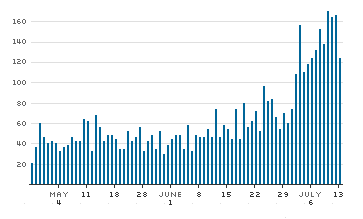
Since I started using the excellent SpamBayes Outlook Addin spam filter three-and-a-half months ago, I’ve gotten an average of 64 junk email per day. That’s a total of 4993 junk email (I’m sure I’ll have gotten #5000 by the time you’ve read this). In the last week I’ve gotten an average of 150 junk email per day.
Fortunately, thanks to the SpamBayes plugin and since I have a high-bandwidth internet connection, this isn’t much of a problem for me. Still — 150 junk mail a day? What a terrific waste of time and resources.
The following chart shows the amount of junk email I’ve gotten each day since late May, 2003.
Junk Email per Day
I get remarkably little spam at my primary email address, considering how widely it’s publicized: maybe two per day. My parents get much, much more. They were AOL users for quite a while (I’ve since weaned them, but it wasn’t easy) and that’s definitely a factor. I’d like to think I’m escaping the typical barrage because it’s widely known that my penis doesn’t need enlarging, but that’s a private conceit that may not measure up.
Part of turning the spam volume down for my parents and others has been to teach (again, not easily) a general scheme of email prophylaxis. Surely you’re hip to this stuff, Steven, but maybe it bears saying aloud if you’ll permit me.
Points that folks should understand clearly:
1. You should never share an email address with another person, that is, have multiple users for the same address.
It’s crazy how many people started out with one address for the family or couple (especially older folks) and are reluctant to change that. If unprotected sex is like sleeping with everyone your partner has ever slept with, email address sharing is just as bad. I think many folks are afraid they’ll look like they have something to hide if they break out. That’s dumb.
2. Always have and use at least two email addresses for general communication. Be aware that these aren’t the last two email addresses you’ll use in your lifetime, that you’ll be replacing at least one of them every few years.
This means one address that you give out promiscuously for services that require one, and another for known correspondents. The more (though not perfectly) private address should be dispensed solemnly, à la “Let me give you my private email; please don’t share it with anyone or put it on any lists you send to. I get so much junk as it is.” Naturally this address gets your greater attention.
3. Don’t rely on the email address granted by your ISP, or make that your lax address.
4. Register a domain and have it hosted, if only to gain control of your email accounts.
It’s not expensive. I arrange hosting of domains for many friends and relatives through a reseller account with my host. Half of them have no Web content, they’re just for email. Find a friend like me, ask him to register a domain and get it configured at a webhost for you, and take him to dinner twice a year. You were probably going to do that anyway, considering all the free tech support he gives you.
Probably you’ll get a control panel where — without your friend’s help — you can create email accounts and change passwords, plus a webmail application. Hell, my daughters use webmail exclusively since they may be at their mother’s, my place, or a friend or relative’s at any given moment. They’ve never used anything else.
5. Resist giving out even your lax email address unless absolutely necessary for the service you’re interested in.
Sometimes it only *looks* like one is required. AOV’s commenting system, for instance, makes clear that it’s optional. Others consider it optional but don’t say so. Try submitting your request without one. If it goes through, you win.
6. Since you have some hosted webspace, put up at least a placeholder page with an encrypted mailto: link.
When you want to share contact information, point folks to that page. (See Dan Benjamin’s Enkoder for an easy way to construct the encrypted link.) The address doesn’t exist in the page’s source, thus can’t be harvested. It is formed in your visitors’ browsers at load time. There’s nothing to explain: everybody knows how to click a mailto: link.
7. If possible, use an email client that won’t load images in HTML-format email messages unless you authorize it (Mozilla Thunderbird comes to mind).
Just as one should never respond to spam because it confirms the validity of your address (spammers send messages blindly, hoping they’ll go through) <img> tags are commonly serialized and pointed to a source that’s not an image at all but a script, which logs your opening of the message. I repeat, this is common.
8. If possible, use a product like Steven’s recommended SpamBayes Outlook Addin
… or SpamAssassin (which I use, though — as mentioned — following all of the previous steps prevents most spam for me in the first place). Your friendly neighborhood Web guy can help with this. SpamAssassin uses similar Bayes filtering algorithms, but must be configured on the server.
Sorry for the length; this should probably be posted on one of my own sites (kinda got on a roll). Yet I know how little spam I get, and that this general prophylaxis works very well.
Education and a tiny bit of technology skins most of this cat, at least for now. It’s really not about technology at all. It’s an attitude.
(I will write this up elsewhere, but does anyone here have more tips along these lines? And thanks for the soapbox, Steven.)
Thanks for the really helpful guide. My problem is that my web site is really old – 5 years plus and at the time there was no spam problem and my address is prominently displayed.
I use Spam Killer and it is quite effective cuts my spam by about 80%
Lou, this site (and all the sites on the silverorange weblog platform) does obfuscate email addresses to hinder spam harvesters.
I moved my obfuscated email link from an internal page to the front page of my blog and have started getting some spam where I received none before. I did not appreciate that the source was scraped rather than the page itself. I will probably remove it again to an internal spot.
POPFile which you can find on SourceForge is great. You train it to catch junk mail… mine took a couple days.
Since May 27, 2003…
Emails classified: 18,395
Classification errors: 87
——————————-
Accuracy: 99.52%
For those doing the math, thats about 370 emails a day it filters.
-Dico
Alan: What sort of obfuscation were you using (I see you’re letting it all hang out at GenX40 right now). The reason I ask is that it’s only a matter of time before harvestors start reading page output — including client-side scripted output — but I’d thought it would awhile. This bears watching.
I just tossed out some chum on my personal site’s home page, near my regular encoded mailto. Let’s see how long it takes to be harvested.
Lou, the truth is I do what Steve tells me to do.
Instead of having my email set out in text it was set into an “email me” sort of link [as Steve showed me] on my ID page which itself was linked from the front page. I then moved the “email me” link to the front page. The link contains the email so I can only guess the combo of the email being in the source code and sitting that on the home page is how those resourceful Nigerians found me. I think ISN and Kevin O’Brien use great filtering as they still only account for 3 or so a day.
I’ve been using the beta version of Outlook 2003 for about 2 months now. It has a bit of a spamfilter built in (not the old junk senders list either). For me its been fairly effective, but it does let through some ads, etc from Ebay, Staples… but thats not really spam I guess since I’ve bought things there.
Has anyone else treid the new Outlook 2003 spam filter?
Alan: The page source is what robotic harvesters currently parse, looking for the typical email address character pattern. The robots (today) aren’t aware of what’s on screen at all, that’s why the javascript obfuscation Steven uses works: the mailto links on this page don’t exist in the page source at all, not in a recognizable pattern. They’re rendered in our browsers when we humans load the page.
There’s nothing to stop the harvester robots from becoming more intelligent, interpreting pages more as a browser would in order to do screen scraping. Right now they get plenty of email addresses without bothering; that’s the only barrier.
The webform-based version of Dan Benjamin’s Enkoder is easier to use than the standalone one I linked to above; I’d apply it right away since you’re currently unprotected at GenX40. Steven’s technique is more than adequate right now, Dan’s will endure a little longer; eventually both will be defeated, though I’d guess that’s at least a year away. It’ll be interesting to see when the harvestors crack it.
Right now I get no where near Steve’s spam due mostly to what I like to call “the early stage in my inevitable global adoption curve”. What do you think, Steve? Is a more radical layering required or is the cat out of the bag and only a regular restructuring of email addresses for each blog work. I suppose if the address sits behind an “email me” link no one writing you would really care?
Steve, you’re my hero. I’ve owned a domain for six years now and spam has been an ever-increasing problem. I always wondered whether there was a simple (and free!) equivalent to the training algorithm used in Apple’s mail app, but never bothered to look into it. Thanks for the heads up!
What about rule #9?:
9. Never enable any kind of email preview.
In this respect, Outlook Express is far superior to Outlook in that it allows you to view the source of an email without opening it. What I find most remarkable is that Outlook, presumably the more advanced Big Brother of Outlook Express, doesn’t even have a ‘Properties’ option for a message.
Willem: In Outlook 2000 you can view all of an inbound message’s headers, though MS doesn’t make this obvious. Open the message and select View -> Options.
The source of an HTML-format message’s body (only) can be seen by opening the message, right-clicking in the body, and selecting View Source.
Natch, none of this can be done without first opening the message, which gives you away.
I get around most of this by using the email checker POP Peeper, which quietly polls all my accounts every X minutes. It can be configured to display messages in plaintext only, which defeats the <img src> trick. I have it download entire messages (rather than just headers) so I read everything first in POP Peeper and only fire-up Outlook when I actually want to save or reply to a message. Most of my email is read and deleted without Outlook being cluttered, or involved at all.
Tried many such email checkers over the years, and POP Peeper (Windows-only) is the best. It’s continuously improved, and free. Recommend it highly.
An all-in-one-client approach might be better (then again, it might not be). Waiting to see how Thunderbird Mail matures; looks like the best hope along these lines.
Lou’s advice is about as good as it gets. If I had someone tell me that in 1994 I would not be receiving over 200 spams a day. Oh wait, that was 36 hours ago. Now I am receiving zero spams. After trying just about every spam blocker out there – most requiring a client to run before I run my usual client, I decided to take Dean Allen’s suggestion and try a Knowspam demo.
Now I am feeling lonely. No pills, porn or pecker enhancement mails. Just mail I want to receive. How refreshing.
Knowspam will cost $19.95 a year. If it continues to work as well as it has over the past 36 hours I will gladly pay.